

- Pokémon Essentials Version
- Non-applicable
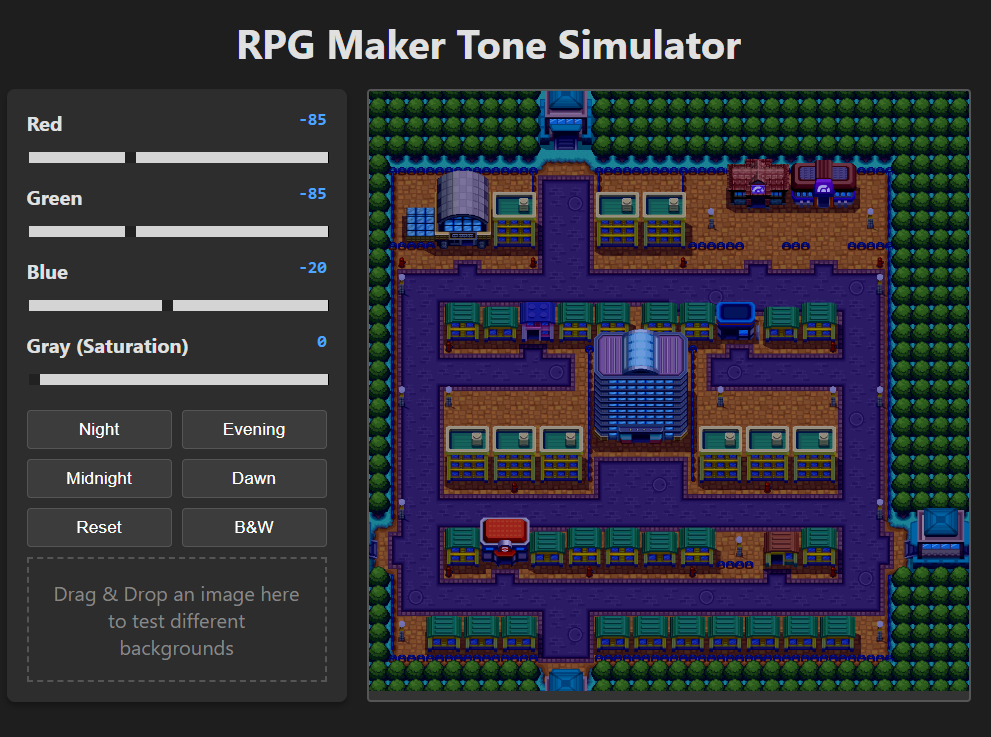
Overview:
This tool's sole purpose is to make it easier to manipulate the tones of the day and night cycle. Personally, I don't like how bright the night is, for example. And I couldn't find any website that worked with RGBG and supported negative values for the life of me (or maybe I just didn't search deep enough). So I decided to make it myself, and as a bonus, to be able to preview how the result would look without having to open the game and change the cycle to test the tones.
Although the focus is on Essentials and the Day/Night Cycles, it is not made exclusively for them; it can be used to change the Tones of the PSDK Cycles and any other code line that uses RGB values.
Tool Features:
- Drag and Drop system for you to test screenshots of your maps and see how the tones are applied to them (I recommend a screenshot taken during the Day cycle where no tones are applied).
- Standard presents value for Day, Night, Dawn, Evening, and Midnight, with Black/White as a Bonus.
- The change of values applies in real time.
- Maybe more to come.
- Just download and extract the Zip file, the file will open a new tab in the browser. No installation is necessary.
- Credits
- WillowLee


