
- Pokémon Essentials Version
- v21.1 ✅
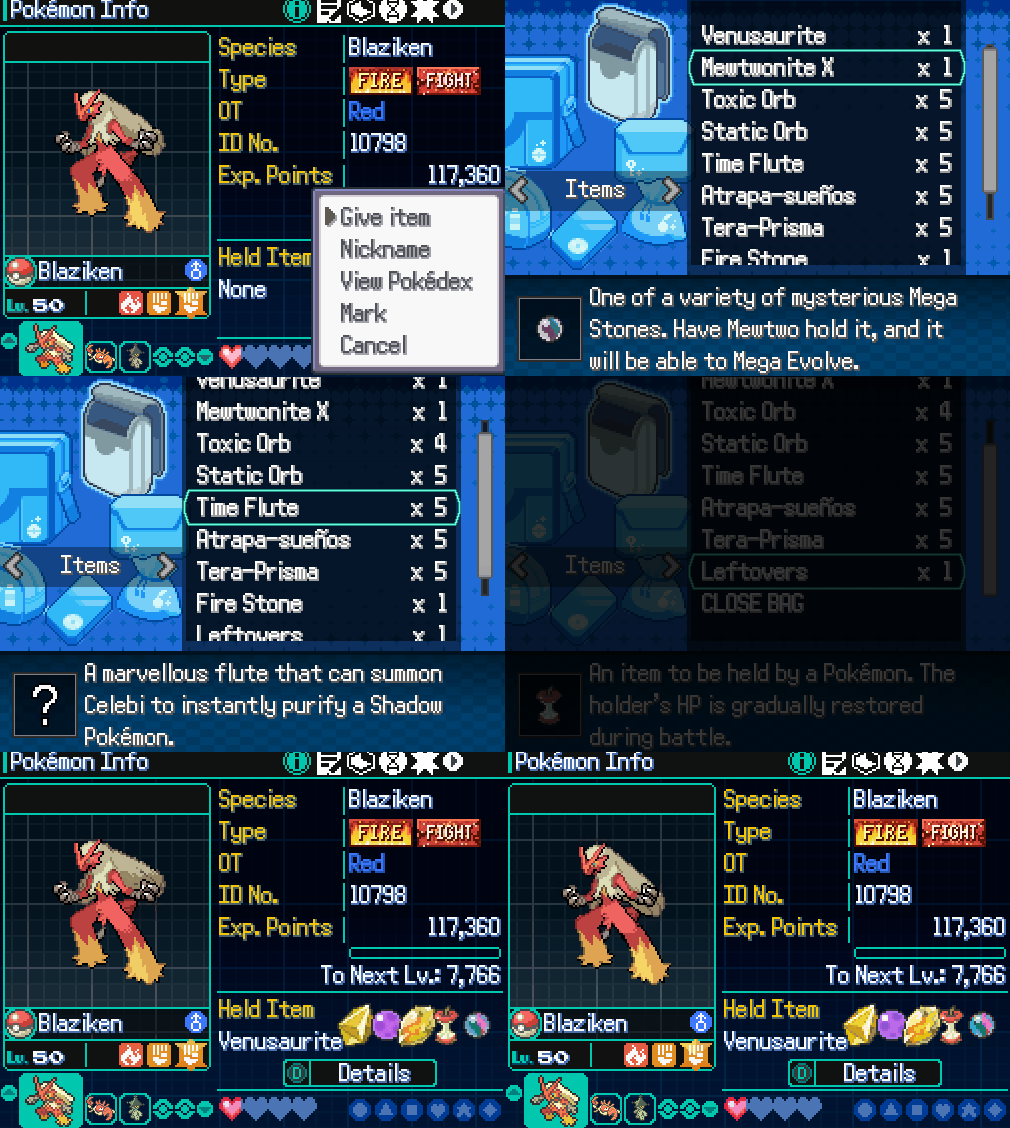
Please read everything as I try to answer as many questions here. :') (Reading is fun I swear!)
Each of these plugins can work separately, and both are fairly modular. Joint features coming soon
Important Information
1) Since the Multiple Held Items plugin has reworked every item interaction, not every interaction has been tested. If you have any bugs please report them to me via discord @wetuhchip, or post it here.
2) The base Summary UI can comfortably fit 8-10 items, after that, it looks a little jank, bear that in mind.
3) There are currently no restrictions as to how many items a Pokémon can hold. For example, you can stack choice items, you can have 50 Sitrus Berries if you wanted.
4) These plugins REQUIRE the Generation 9 Pack to be installed. The link for it can be found here: Generation 9 Resource Pack - Credits: Caruban, Lucidious89, and others. (See resource page for entire credits list)
5) If you have made any modifications to either of these scripts, (not the Generation 9 Pack) (refer to Script Modifications below) and are willing to make them public, please send them to me and I will add them to the post! Or if you have any ideas for future features.
Installation
1) If you want both plugins, installation should be as simple as extracting this zip file into your game's root folder and replacing any files if prompted. The config options are in Plugins/Roguelike Items/000_Config.rb. They should be self explanatory.
2) If you want just one of the plugins to be installed, drag the respective files into their proper folders, and make sure the meta.txt file is still included.
Usage
Multiple Held Items

1) The new script commands for the Multiple Held Items are as follows:
Each of these plugins can work separately, and both are fairly modular. Joint features coming soon
Important Information
1) Since the Multiple Held Items plugin has reworked every item interaction, not every interaction has been tested. If you have any bugs please report them to me via discord @wetuhchip, or post it here.
2) The base Summary UI can comfortably fit 8-10 items, after that, it looks a little jank, bear that in mind.
3) There are currently no restrictions as to how many items a Pokémon can hold. For example, you can stack choice items, you can have 50 Sitrus Berries if you wanted.
4) These plugins REQUIRE the Generation 9 Pack to be installed. The link for it can be found here: Generation 9 Resource Pack - Credits: Caruban, Lucidious89, and others. (See resource page for entire credits list)
5) If you have made any modifications to either of these scripts, (not the Generation 9 Pack) (refer to Script Modifications below) and are willing to make them public, please send them to me and I will add them to the post! Or if you have any ideas for future features.
Installation
1) If you want both plugins, installation should be as simple as extracting this zip file into your game's root folder and replacing any files if prompted. The config options are in Plugins/Roguelike Items/000_Config.rb. They should be self explanatory.
2) If you want just one of the plugins to be installed, drag the respective files into their proper folders, and make sure the meta.txt file is still included.
Usage
Multiple Held Items
1) The new script commands for the Multiple Held Items are as follows:
Ruby:
pkmn.add_item(item) # Gives the Pokemon an item if it doesn't have the max number of items already
pkmn.item = item # Same as above

pkmn.remove_item(item) # Gives the Pokemon an item if it doesn't have the max number of items already
pkmn.item = nil # Removes the last item the Pokemon is holding

pkmn.item_count # Checks the number of items the Pokemon is holding

pkmn.items_full? # Checks if the Pokemon has the max number of held items

pkmn.items_empty? # Checks if the Pokemon has no held items
2) To give Trainers multiple items, just add them in with commas in the item section for the pokemon in trainers.txt.
Here's an example:
Here's an example:
Code:
[TEST,Test]
Pokemon = MUDKIP,10
    Moves = EXPLOSION
    Item = BLACKSLUDGE,FLAMEORB # Notice the second item here, it's as simple as that!
For a wild static encounter to have Multiple Held Items, the simplest way is to add the items to a Pokémon object:
Here's an example:
Here's an example:
Code:
pkmn = Pokemon.new(:SWAMPERT, 50)
pkmn.add_item(:MYSTICWATER)
pkmn.add_item(:CHOICESCARF)
WildBattle.start(pkmn)
Post Battle Reward UI

This Reward UI shows up at the end of every battle, you can edit the item rarities and setup different Pools based on certain conditions! Pretty cool, huh?
The reward pools are defined in Plugins/Roguelike Items/Reward Pools/999_Pools.rb. You can edit the pools that are already defined if you don't have any extra conditions. But to add new rewards to the pool, here's the format:
This Reward UI shows up at the end of every battle, you can edit the item rarities and setup different Pools based on certain conditions! Pretty cool, huh?
The reward pools are defined in Plugins/Roguelike Items/Reward Pools/999_Pools.rb. You can edit the pools that are already defined if you don't have any extra conditions. But to add new rewards to the pool, here's the format:
Code:
GameData::RewardPool.register({
  # Name of the pool (must be unique)
  :id        => :pikachu_pools,
  # The condition for the items in this pool to be considered
  :condition => proc { $player.party.any? { |pkmn| pkmn.isSpecies?(:PIKACHU) } },
  # The arrays of items for all the different rarities
  :rare      => [:ALOLACAP, :KALOSCAP, :HOENNCAP]
  :epic      => [:LIGHTBALL, :COSPLAYITEM],
  :legendary => [:PIKASHNIUMZ]
  # If you have a custom rarity defined in the config you can just include it here. Eg:
  # :mythic => [:PIKACHUNITE]
})
Whatever pools are defined in Plugins/Roguelike Items/Reward Pools/999_Pools.rb will be combined and the rewards in the screen will be in the rewards screen based on the rarity they have.
The Rewards screen is self contained and doesn't have any extra settings when its called. Enabling and disabling it and changing the reward count is all done from the config options. If for some reason you still wanna show the rewards screen, you can do it using the command:
Code:
pbShowRewardsScreenForcing Rarities
You can add battle rules before a battle to customize particular item rarities. Eg:
Code:
setBattleRule("itemRarity_epic", 80) # The item of this rarity now has an 80% chance of appearing. Also allows setting an rarity's chance to 0 if you need itScript Modifications - Community Contributions
- (Credits: Sonicover)
Item Restrictions & Categories, Wild Held Items - Multiple Held Items - (Credits: Sonicover)
With the base plugin, there are really no item limitations. For example, you can hold multiple choice scarfs if you wanted. But let's say that not something you want the player to be able to do. Fret not my friend! Thanks to Sonicover (Creator of BW Medals / Archivement System), he was able to setup Item Categories. (Fair warning, the items are a little hard to categorize.
This is still being tested and updated, please report any bugs to me (@wetuhchip) on discord please as to not spam Sonicover!
Installation
Step 1)
To achieve this, you also need to install Modular UI Scenes - Credit: Lucidious89
WARNING these modifications are made with the [SV] Summary Screen in mind. Credits: Shashu-Greninja
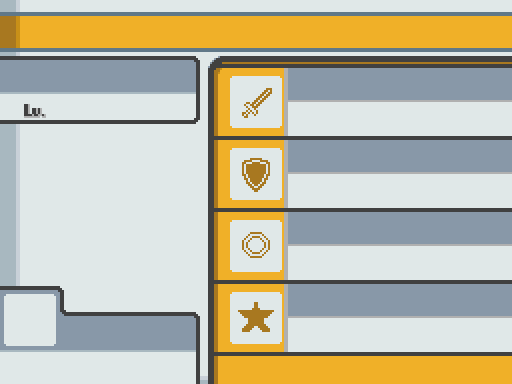
However, I've attached a graphic made with the base Essentials style in mind, you will just be missing out in the item description feature from [SV] Summary Screen. (And a very good summary overhaul)
WARNING: There may be some errors when trying to use these modifications without the [SV] Summary Screen, or some issues with certain UI placements, with this plugin being fairly modular you can comment out what you want and don't want.
Version 1: [SV] Summary Screen - Credits: Sonicover, Shashu-Greninja:
[SV] Summary Screen
(Recommended, it's a pretty plugin)

Version 2: Base Essentials - Credits: Sonicover
IMPORTANT NOTES PLEASE READ:
Make sure you are defining the Item Flags, here is an example:
With the base plugin, there are really no item limitations. For example, you can hold multiple choice scarfs if you wanted. But let's say that not something you want the player to be able to do. Fret not my friend! Thanks to Sonicover (Creator of BW Medals / Archivement System), he was able to setup Item Categories. (Fair warning, the items are a little hard to categorize.
This is still being tested and updated, please report any bugs to me (@wetuhchip) on discord please as to not spam Sonicover!
Installation
Step 1)
To achieve this, you also need to install Modular UI Scenes - Credit: Lucidious89
WARNING these modifications are made with the [SV] Summary Screen in mind. Credits: Shashu-Greninja
However, I've attached a graphic made with the base Essentials style in mind, you will just be missing out in the item description feature from [SV] Summary Screen. (And a very good summary overhaul)
WARNING: There may be some errors when trying to use these modifications without the [SV] Summary Screen, or some issues with certain UI placements, with this plugin being fairly modular you can comment out what you want and don't want.
Version 1: [SV] Summary Screen - Credits: Sonicover, Shashu-Greninja:
[SV] Summary Screen
(Recommended, it's a pretty plugin)
Version 2: Base Essentials - Credits: Sonicover
IMPORTANT NOTES PLEASE READ:
Make sure you are defining the Item Flags, here is an example:
Ruby:
#-------------------------------
[LEFTOVERS]
Name = Leftovers
NamePlural = Leftovers
PortionName = serving of Leftovers
PortionNamePlural = servings of Leftovers
Pocket = 1
Price = 20000
SellPrice = 5000
BPPrice = 25
Flags = Fling_10,Utility
Description = An item to be held by a Pokémon. The holder's HP is gradually restored during battle.

Leftovers being an utility one for example. An item that has no category flag assigned is considered [B]Special[/B] by default.- The "category" for items "offensive, defensive and utility" and are defined by a flag in the item's PBS (Offensive, Defensive and Utility respectively). The code is not made to handle an item having more than 1 of those categories but if you want, you'll just need to modify pbGiveItemToPokemon method and the "move" one to accept them.
- Since it's based off my game, all berries are defined as "Utility" items. You can just remove the "|| item_data.is_berry?" from pbItemCategory to not give them that category by default. Of course, you'll need to go to each berry and give it a flag then.
- Items with no Offensive, Defensive or Utility flag are designated as "Extra" by default. Still, only 1 extra item per mon. You could hardcode megastones and Z crystals to be offensive or utility, but I feel they fit better as extra to not limit any Pokémon's Mega set.
- The way Wild Items give a Pokémon their item is a bit odd. Items are defined in this manner: [ID, minimum level, maximum level, chance]. However, items who's "Chance" succeeded will first be added to an special variable, from which the code will select one item, with equal odds among them.
- Since items are chosen from a list, no item can be guaranteed to always appear, unless you make it the literally only option for that species, and that it's type does not have an item in the same category that might fight it (Because equal odds)
DOWNLOAD:
Just place the contents from this Multi Item Add-On, into the Multi Held Items folder in the plugins, and replace your bg_items page with the ones provided.
Just place the contents from this Multi Item Add-On, into the Multi Held Items folder in the plugins, and replace your bg_items page with the ones provided.
Future Plans (Open to ideas!)
1) All wild encounters being able to hold multiple definable items (Currently being tested, if you would like to help test, the wild encounter code is in the Multi Item Add-on script above, just only drag the Wild Item Sets.rb into the Multi Item plugin folder)
2) Wild encounters can drop their held items and have them show up in the Reward UI (Currently being tested)
3) Custom Bosses with HP Shields / Boss Shields (Referencing: Boss Shields PokeRogue) (Potentially in the works)
4) If anyone has ideas they'd like to be implemented, let me know! I would love to get as much community involvement as possible. :')
- Credits
- GolisopodUser
WetChip
Sonicover
PokeRogue (Inspiration for both plugins)
Generation 9 Resource Pack - Caruban, Lucidious89, and others. (See resource page for entire credits list)
