

EV Clearing NPCs are a good Quality of Life feature that the modern games have incorporated for a reason. Most players don't like grinding massive amounts of EV reducing berries without being able to buy them and would rather grind out EVs as the process is generally more mentally stimulating and there are ways to speed up the process. Unless you have the exact number of EVs displayed to the player somewhere in the UI, keeping track of how many EVs have been reduced can also be a handful.
There are built-in ways to add an EV clearing NPC in vanilla essentials, and it is easy!
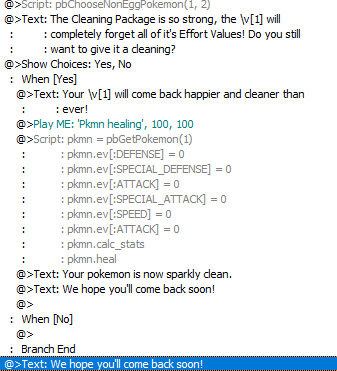
Here’s the actual code if you want to do this. If you want to learn how this code works, scroll down.
Editing a pokemon has several steps.
1. Getting the game to select the pokemon.
1a. Check to make sure it’s possible to apply the edit (such as checking if the pokemon is genderless if you’re trying to swap genders). You won't need to check this time, as this is basically overwriting the existing EVs to 0. But it's good to know in the future.
2. Having the game apply the edit to the pokemon it has selected.
pbChooseNonEggPokemon(1,2) is fairly simple. The (Miraheze, not fandom!) wiki explains how this selection method works, but one thing you need to know for sure is that if you use this method, you must have two variables in it or else you will get an error. The game wants two variables. Also fun fact, if you use \v[2] on a nicknameless pokemon with this selection method, it will return 0, resulting in the pokemon being referred to as 0.
This isn't the only selection method, but pbChooseNonEggPokemon prompts the player to make a direct selection of the pokemon they want edited, so it's the most convenient one.
pkmn = pbGetPokemon(1) tells the game to get the variable and to put it into pkmn. You can still use pbChooseNonEggPokemon(1,2) in the actual EV-changing part of the script as the player has already selected a variable, but this is clunky as you don't need 2 since no dialogue referring to the pokemon's nickname is being displayed in the script. pbGetPokemon(1) is more elegant, and since you already ran pbChooseNonEggPokemon(1,2) previously in the event the game will simple retrieve the pokemon stored in 1.
I also want to add that defining what "pkmn" is isn't strictly necessary. You can simply use pbGetPokemon(1).ev[:DEFENSE] = 0 ect ect if it's more convenient for you. But it's less clunky to use pkmn so it's defined beforehand.
WARNING: pkmn is not a coded function, merely a placeholder for the actual variable selection! While the game remembers variables within the span of a single event, it doesn't extend this to text placeholders. Only use pkmn in the same script it gets defined in, not event. The game will not remember what "pkmn" is in the span of a single event, only the script chunk. Do not define pkmn when the player selects a pokemon unless you also plan on doing something with pkmn in the same script chunk!
WARNING 2: Also do not do pkmn.calc_stats after pkmn.heal. The game does not like it and you will get a black screen if you try to play it.
We run pkmn.calc_stats as it reminds the game to recalculate the stats, as we just did something to the pokemon's stats. You don't need to heal the pokemon, I just added it as this is for a pokemon spa so it makes sense why a pokemon would feel all refreshed at the end!
Here's the end of the tutorial! Feel free to add comments or corrections.
There are built-in ways to add an EV clearing NPC in vanilla essentials, and it is easy!
Here’s the actual code if you want to do this. If you want to learn how this code works, scroll down.
Editing a pokemon has several steps.
1. Getting the game to select the pokemon.
1a. Check to make sure it’s possible to apply the edit (such as checking if the pokemon is genderless if you’re trying to swap genders). You won't need to check this time, as this is basically overwriting the existing EVs to 0. But it's good to know in the future.
2. Having the game apply the edit to the pokemon it has selected.
pbChooseNonEggPokemon(1,2) is fairly simple. The (Miraheze, not fandom!) wiki explains how this selection method works, but one thing you need to know for sure is that if you use this method, you must have two variables in it or else you will get an error. The game wants two variables. Also fun fact, if you use \v[2] on a nicknameless pokemon with this selection method, it will return 0, resulting in the pokemon being referred to as 0.
This isn't the only selection method, but pbChooseNonEggPokemon prompts the player to make a direct selection of the pokemon they want edited, so it's the most convenient one.
pkmn = pbGetPokemon(1) tells the game to get the variable and to put it into pkmn. You can still use pbChooseNonEggPokemon(1,2) in the actual EV-changing part of the script as the player has already selected a variable, but this is clunky as you don't need 2 since no dialogue referring to the pokemon's nickname is being displayed in the script. pbGetPokemon(1) is more elegant, and since you already ran pbChooseNonEggPokemon(1,2) previously in the event the game will simple retrieve the pokemon stored in 1.
I also want to add that defining what "pkmn" is isn't strictly necessary. You can simply use pbGetPokemon(1).ev[:DEFENSE] = 0 ect ect if it's more convenient for you. But it's less clunky to use pkmn so it's defined beforehand.
WARNING: pkmn is not a coded function, merely a placeholder for the actual variable selection! While the game remembers variables within the span of a single event, it doesn't extend this to text placeholders. Only use pkmn in the same script it gets defined in, not event. The game will not remember what "pkmn" is in the span of a single event, only the script chunk. Do not define pkmn when the player selects a pokemon unless you also plan on doing something with pkmn in the same script chunk!
WARNING 2: Also do not do pkmn.calc_stats after pkmn.heal. The game does not like it and you will get a black screen if you try to play it.
We run pkmn.calc_stats as it reminds the game to recalculate the stats, as we just did something to the pokemon's stats. You don't need to heal the pokemon, I just added it as this is for a pokemon spa so it makes sense why a pokemon would feel all refreshed at the end!
Here's the end of the tutorial! Feel free to add comments or corrections.
- Credits
- LilyInTheWater
